> For the complete documentation index, see [llms.txt](https://coding-9.gitbook.io/untitled/llms.txt). Markdown versions of documentation pages are available by appending `.md` to page URLs; this page is available as [Markdown](https://coding-9.gitbook.io/untitled/trees/bst/173.-binary-search-tree-iterator.md).
# 173. Binary Search Tree Iterator
## Problem Statement
Implement the `BSTIterator` class that represents an iterator over the [**in-order traversal**](https://en.wikipedia.org/wiki/Tree_traversal#In-order_\(LNR\)) of a binary search tree (BST):
* `BSTIterator(TreeNode root)` Initializes an object of the `BSTIterator` class. The `root` of the BST is given as part of the constructor. The pointer should be initialized to a non-existent number smaller than any element in the BST.
* `boolean hasNext()` Returns `true` if there exists a number in the traversal to the right of the pointer, otherwise returns `false`.
* `int next()` Moves the pointer to the right, then returns the number at the pointer.
Notice that by initializing the pointer to a non-existent smallest number, the first call to `next()` will return the smallest element in the BST.
You may assume that `next()` calls will always be valid. That is, there will be at least a next number in the in-order traversal when `next()` is called.
**Example 1:**
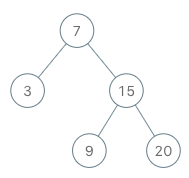
Input
["BSTIterator", "next", "next", "hasNext", "next", "hasNext", "next", "hasNext", "next", "hasNext"]
[[[7, 3, 15, null, null, 9, 20]], [], [], [], [], [], [], [], [], []]
Output
[null, 3, 7, true, 9, true, 15, true, 20, false]

Explanation
BSTIterator bSTIterator = new BSTIterator([7, 3, 15, null, null, 9, 20]);
bSTIterator.next();    // return 3
bSTIterator.next();    // return 7
bSTIterator.hasNext(); // return True
bSTIterator.next();    // return 9
bSTIterator.hasNext(); // return True
bSTIterator.next();    // return 15
bSTIterator.hasNext(); // return True
bSTIterator.next();    // return 20
bSTIterator.hasNext(); // return False
**Constraints:**
* The number of nodes in the tree is in the range `[1, 105]`.
* `0 <= Node.val <= 106`
* At most `105` calls will be made to `hasNext`, and `next`.
**Follow up:**
* Could you implement `next()` and `hasNext()` to run in average `O(1)` time and use `O(h)` memory, where `h` is the height of the tree?
## Intuition
```
Approach 1:
Store inorder and return the answers
Approach 2:
Push left into the stack
Go inorder if left is null, the top of stack is the next element(1st inorder element)
Now after returing next
Push all right of that node,
If stack becomes empty then, no hasnext;
sC = O(H).
TC = O(1) avergege due to stack pushes
```
### Links
### Video Links
### Approach 1:
```
```
{% code title="C++" lineNumbers="true" %}
```cpp
class BSTIterator {
public:
vector temp;
int i=0;
void find_inorder(TreeNode* root){
if(root == nullptr)
return ;
find_inorder(root->left);
temp.push_back(root->val);
find_inorder(root->right);
}
BSTIterator(TreeNode* root) {
TreeNode* temp = root;
find_inorder(temp);
}
int next() {
return temp[i++];
}
bool hasNext() {
return i s;
void push_all(TreeNode* root){
while(root){
s.push(root);
root=root->left;
}
}
BSTIterator(TreeNode* root) {
push_all(root);
}
int next() {
TreeNode *temp = s.top();
s.pop();
push_all(temp->right);
return temp->val;
}
bool hasNext() {
return !s.empty();
}
};
```
{% endcode %}
### Approach 3:
```
```
{% code title="C++" lineNumbers="true" %}
```cpp
```
{% endcode %}
### Approach 4:
```
```
{% code title="C++" lineNumbers="true" %}
```cpp
```
{% endcode %}
### Similar Problems
###